> ## Documentation Index
> Fetch the complete documentation index at: https://docs.acrity.io/llms.txt
> Use this file to discover all available pages before exploring further.
# Repositories
> Connect repositories, configure review, PM, branch rules, VCS webhooks, and architecture bootstrap.
Repositories are Acrity's operational center. They define how pull requests or merge requests are analyzed, which providers are used, and which exceptions apply to each project.
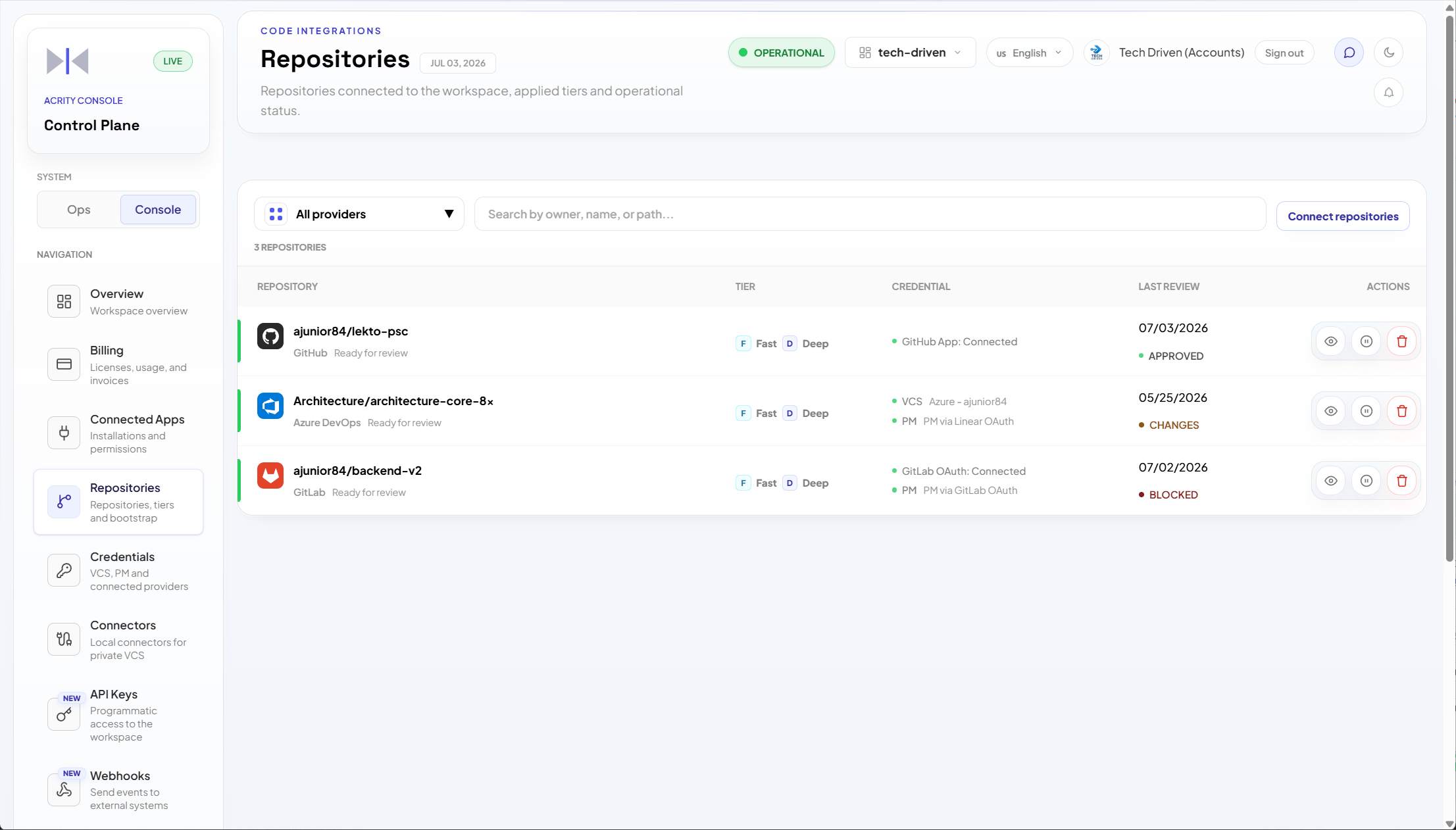
Use `Console > Repositories` to list, connect, configure, pause, validate, and remove repositories.
Track review status, decisions, and findings in the Ops dashboard. Use `Console > Audit Trail` only for technical event details, diagnostics, and administrative audit.
## Who can access
Repositories require a Workspace admin. Platform admins also have access. Roles are fixed capability sets defined by Acrity, not configurable by your organization.
## Connect repositories
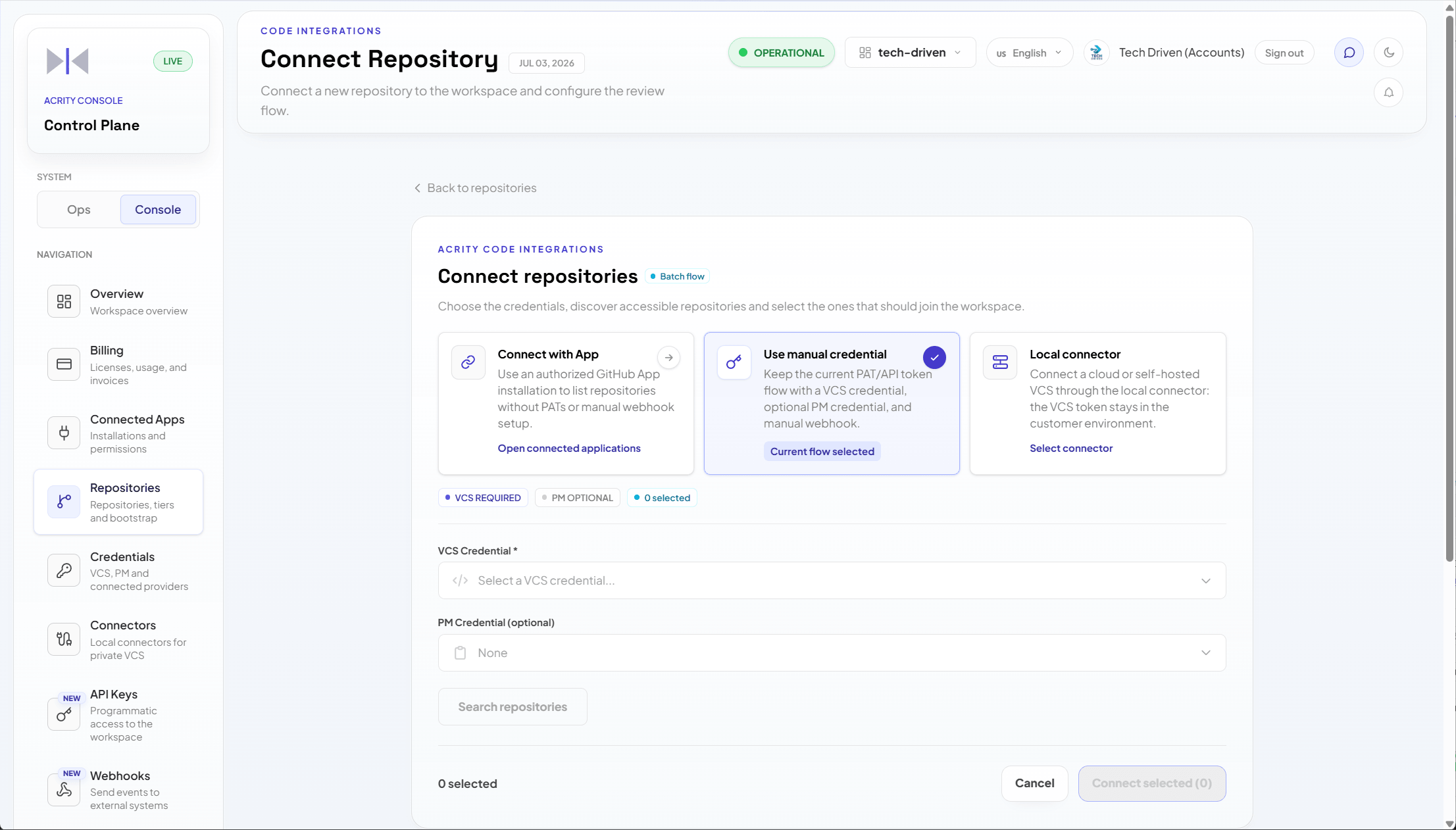
Go to `Console > Repositories > Connect repository`.
Select connected app, manual credential, or local connector.
Choose available repositories or enter names according to the selected source.
Optionally associate a task management provider and extraction fields.
Configure branches, draft behavior, checks, and language when needed.
Save and track readiness status in the list or repository detail page.
 ## Connection methods
| Method | When to use |
| ----------------- | -------------------------------------------------------------------------------- |
| Connected app | SaaS provider with an authorized installation in the workspace. |
| Manual credential | Token or specific credential controlled by the workspace. |
| Local connector | Private, self-hosted VCS or VCS accessible only from the organization's network. |
## Readiness states
A repository must reach **Ready** before Acrity analyzes its pull requests or merge requests. Track the current state in the repository list and on the repository detail page.
Bootstrapping `ARCHITECTURE.md` is required, not optional. Until it is merged, the repository stays in **Awaiting architecture merge** and does not receive reviews.
| State | Meaning | How to advance |
| --------------------------- | ------------------------------------------------------------------------------------------------------------------------------------------------------------ | --------------------------------------------------------------------------------------------------------------------------------- |
| Ready | The connection is authorized, the inbound webhook is valid, and `ARCHITECTURE.md` has been merged. Acrity reviews new PRs/MRs. | No action needed. Keep the connection and webhook healthy. |
| Awaiting architecture merge | Connection and webhook are valid, but the repository still needs its architecture baseline. Bootstrapping `ARCHITECTURE.md` is required and gates readiness. | Open the Bootstrap tab, generate the architecture documentation, and merge `ARCHITECTURE.md` into the target branch. |
| Setup incomplete | Required configuration is missing, such as the inbound webhook, credential, or connector selection. | Finish the Connect repository steps: confirm the source, paste the inbound webhook URL and key into the provider, and revalidate. |
| Blocked | Acrity cannot reach the repository. The credential, connected app, or connector failed validation, or permissions were revoked. | Fix or rotate the credential, reauthorize the connected app, or Revalidate the connector, then confirm permissions. |
```mermaid theme={null}
stateDiagram-v2
state "Setup incomplete" as Setup
state "Blocked" as Blocked
state "Awaiting architecture merge" as Awaiting
state "Ready" as Ready
[*] --> Setup: Repository connected
Setup --> Blocked: Validation fails
Setup --> Awaiting: Connection and webhook valid
Blocked --> Awaiting: Credential or connector fixed
Awaiting --> Ready: ARCHITECTURE.md merged
Ready --> Blocked: Access revoked
Ready --> [*]: Repository removed
```
## List screen
The repository list helps identify:
* connected repositories;
* readiness state;
* VCS provider;
* authentication method;
* latest validation;
* webhook, credential, or connector alerts;
* repositories that require action before receiving reviews.
Use filters and search to find projects quickly. The repository list can show operational hints, but the Ops dashboard is the primary place to track review progress and outcomes.
## Connection methods
| Method | When to use |
| ----------------- | -------------------------------------------------------------------------------- |
| Connected app | SaaS provider with an authorized installation in the workspace. |
| Manual credential | Token or specific credential controlled by the workspace. |
| Local connector | Private, self-hosted VCS or VCS accessible only from the organization's network. |
## Readiness states
A repository must reach **Ready** before Acrity analyzes its pull requests or merge requests. Track the current state in the repository list and on the repository detail page.
Bootstrapping `ARCHITECTURE.md` is required, not optional. Until it is merged, the repository stays in **Awaiting architecture merge** and does not receive reviews.
| State | Meaning | How to advance |
| --------------------------- | ------------------------------------------------------------------------------------------------------------------------------------------------------------ | --------------------------------------------------------------------------------------------------------------------------------- |
| Ready | The connection is authorized, the inbound webhook is valid, and `ARCHITECTURE.md` has been merged. Acrity reviews new PRs/MRs. | No action needed. Keep the connection and webhook healthy. |
| Awaiting architecture merge | Connection and webhook are valid, but the repository still needs its architecture baseline. Bootstrapping `ARCHITECTURE.md` is required and gates readiness. | Open the Bootstrap tab, generate the architecture documentation, and merge `ARCHITECTURE.md` into the target branch. |
| Setup incomplete | Required configuration is missing, such as the inbound webhook, credential, or connector selection. | Finish the Connect repository steps: confirm the source, paste the inbound webhook URL and key into the provider, and revalidate. |
| Blocked | Acrity cannot reach the repository. The credential, connected app, or connector failed validation, or permissions were revoked. | Fix or rotate the credential, reauthorize the connected app, or Revalidate the connector, then confirm permissions. |
```mermaid theme={null}
stateDiagram-v2
state "Setup incomplete" as Setup
state "Blocked" as Blocked
state "Awaiting architecture merge" as Awaiting
state "Ready" as Ready
[*] --> Setup: Repository connected
Setup --> Blocked: Validation fails
Setup --> Awaiting: Connection and webhook valid
Blocked --> Awaiting: Credential or connector fixed
Awaiting --> Ready: ARCHITECTURE.md merged
Ready --> Blocked: Access revoked
Ready --> [*]: Repository removed
```
## List screen
The repository list helps identify:
* connected repositories;
* readiness state;
* VCS provider;
* authentication method;
* latest validation;
* webhook, credential, or connector alerts;
* repositories that require action before receiving reviews.
Use filters and search to find projects quickly. The repository list can show operational hints, but the Ops dashboard is the primary place to track review progress and outcomes.
 ## Repository detail
The detail page concentrates project settings.
| Tab or section | Purpose |
| -------------- | --------------------------------------------------------------------------------------- |
| Settings | General data, provider, authentication, language, review pause, and operational state. |
| PM | Fields and sources used to associate PRs/MRs with tasks, criteria, and product context. |
| Review | Repository-specific tiers and additional instructions. |
| Bootstrap | Assisted flow to prepare or review repository architecture documentation. |
## Repository language
The repository language overrides the workspace default for that project.
Use it when:
* a team works in a different language than the rest of the workspace;
* customer repositories require localized responses;
* review comments need to follow a specific communication standard.
If no language is configured on the repository, Acrity uses the workspace default.
## Branch rules
Branch rules help avoid reviews in scenarios that do not need analysis or generate noise.
Common settings:
* root or main branches, such as `main`, `master`, `develop`, or equivalents;
* ignore merges between root branches;
* rules to ignore specific source and target combinations;
* matching by exact text, prefix, suffix, substring, or configured pattern;
* review of draft PR/MR;
* behavior when provider checks indicate success.
Start with conservative rules. Then adjust based on actual review volume and noisy cases.
## PM integration
PM integration lets Acrity relate PRs/MRs to tasks, acceptance criteria, and product context.
Common fields:
* task identifier;
* acceptance criteria;
* story points;
* sprint;
* epic;
* priority;
* component;
* labels;
* fallback field when the primary information is unavailable.
Common extraction sources:
* branch name;
* PR/MR title;
* PR/MR description;
* comments when enabled by configuration.
## Repository-level review settings
Repository settings should be used for exceptions to the workspace default.
Use them when:
* a project requires different instructions;
* a repository needs only one review tier;
* the team has specific conventions;
* review output should use different language or focus.
Avoid duplicating in the repository what is already well defined in `Console > Policy Engine`.
## Pause and resume reviews
Pausing reviews prevents new automated analyses for the repository while the pause is active.
Use pause when:
* the repository is being migrated;
* the provider is unstable;
* credentials are being rotated;
* the team wants to stop reviews for a planned window;
* rules need to be reviewed before continuing.
Resume as soon as the cause is resolved.
## VCS webhook
The VCS webhook allows provider events to trigger Acrity.
In the Console, you can:
* configure webhook when the provider and connection method allow it;
* revalidate webhook;
* review configuration status;
* identify permission or secret pending items.
If the provider is accessed through a local connector, also follow the `Console > Connectors` documentation.
## How reviews are triggered
Acrity starts a review when your provider sends a pull request or merge request event to Acrity's inbound VCS webhook.
For connected app connections, Acrity registers the webhook for you. For manual credential and local connector connections, you paste the webhook into the provider yourself:
Open the repository detail page and go to the VCS webhook section. Copy the inbound webhook URL and the signing key.
In your VCS provider settings, create a webhook. Paste the URL into the payload or target URL field and the key into the secret field.
Subscribe to pull request or merge request events so the provider notifies Acrity when a PR/MR is opened or updated.
Return to the VCS webhook section and revalidate. Acrity confirms it can receive events before the repository becomes Ready.
```mermaid theme={null}
sequenceDiagram
participant Dev as Developer
participant VCS as VCS provider
participant Acrity as Acrity inbound webhook
participant Review as Review run
Dev->>VCS: Open or update PR/MR
VCS->>Acrity: Send PR/MR event to inbound webhook
Acrity->>Acrity: Verify signing key and branch rules
Acrity->>Review: Start review run
Review-->>Dev: Post review comments on the PR/MR
```
## Architecture bootstrap
The Bootstrap tab helps prepare architecture documentation for the repository when the flow is available.
Use it to:
* check whether the repository already has architecture documentation;
* start assisted generation;
* review proposed material;
* choose target branch when applicable;
* complete the flow with or without commit, according to displayed options;
* repeat or restart when the screen indicates it is allowed.
Review generated content before publishing it to the repository. The organization is responsible for accepting and versioning the documentation.
## Security scans
When enabled, the repository can show security and dependency scan information. Use the screen to track the latest scan, next execution, and available actions.
Data and security details are in `Security > Data handling`.
## Common issues
| Symptom | What to check |
| ------------------------------------- | --------------------------------------------------------------------------------------------------------------------------------------------------------------------------------------------------------------------------- |
| Repository does not become ready | Check credential, connected app, connector, permissions, and webhook. |
| Reviews do not trigger | Check whether the repository is paused, whether the webhook is valid, and whether branch rules ignore the event. Track review state in the Ops dashboard; use Audit Trail only for technical event details and diagnostics. |
| Comments appear in the wrong language | Check repository language and workspace language. |
| PM task is not found | Review extraction sources and fields configured in the PM tab. |
| Too many irrelevant PRs are reviewed | Adjust branch rules, draft review, and workspace author policy. |
## Repository detail
The detail page concentrates project settings.
| Tab or section | Purpose |
| -------------- | --------------------------------------------------------------------------------------- |
| Settings | General data, provider, authentication, language, review pause, and operational state. |
| PM | Fields and sources used to associate PRs/MRs with tasks, criteria, and product context. |
| Review | Repository-specific tiers and additional instructions. |
| Bootstrap | Assisted flow to prepare or review repository architecture documentation. |
## Repository language
The repository language overrides the workspace default for that project.
Use it when:
* a team works in a different language than the rest of the workspace;
* customer repositories require localized responses;
* review comments need to follow a specific communication standard.
If no language is configured on the repository, Acrity uses the workspace default.
## Branch rules
Branch rules help avoid reviews in scenarios that do not need analysis or generate noise.
Common settings:
* root or main branches, such as `main`, `master`, `develop`, or equivalents;
* ignore merges between root branches;
* rules to ignore specific source and target combinations;
* matching by exact text, prefix, suffix, substring, or configured pattern;
* review of draft PR/MR;
* behavior when provider checks indicate success.
Start with conservative rules. Then adjust based on actual review volume and noisy cases.
## PM integration
PM integration lets Acrity relate PRs/MRs to tasks, acceptance criteria, and product context.
Common fields:
* task identifier;
* acceptance criteria;
* story points;
* sprint;
* epic;
* priority;
* component;
* labels;
* fallback field when the primary information is unavailable.
Common extraction sources:
* branch name;
* PR/MR title;
* PR/MR description;
* comments when enabled by configuration.
## Repository-level review settings
Repository settings should be used for exceptions to the workspace default.
Use them when:
* a project requires different instructions;
* a repository needs only one review tier;
* the team has specific conventions;
* review output should use different language or focus.
Avoid duplicating in the repository what is already well defined in `Console > Policy Engine`.
## Pause and resume reviews
Pausing reviews prevents new automated analyses for the repository while the pause is active.
Use pause when:
* the repository is being migrated;
* the provider is unstable;
* credentials are being rotated;
* the team wants to stop reviews for a planned window;
* rules need to be reviewed before continuing.
Resume as soon as the cause is resolved.
## VCS webhook
The VCS webhook allows provider events to trigger Acrity.
In the Console, you can:
* configure webhook when the provider and connection method allow it;
* revalidate webhook;
* review configuration status;
* identify permission or secret pending items.
If the provider is accessed through a local connector, also follow the `Console > Connectors` documentation.
## How reviews are triggered
Acrity starts a review when your provider sends a pull request or merge request event to Acrity's inbound VCS webhook.
For connected app connections, Acrity registers the webhook for you. For manual credential and local connector connections, you paste the webhook into the provider yourself:
Open the repository detail page and go to the VCS webhook section. Copy the inbound webhook URL and the signing key.
In your VCS provider settings, create a webhook. Paste the URL into the payload or target URL field and the key into the secret field.
Subscribe to pull request or merge request events so the provider notifies Acrity when a PR/MR is opened or updated.
Return to the VCS webhook section and revalidate. Acrity confirms it can receive events before the repository becomes Ready.
```mermaid theme={null}
sequenceDiagram
participant Dev as Developer
participant VCS as VCS provider
participant Acrity as Acrity inbound webhook
participant Review as Review run
Dev->>VCS: Open or update PR/MR
VCS->>Acrity: Send PR/MR event to inbound webhook
Acrity->>Acrity: Verify signing key and branch rules
Acrity->>Review: Start review run
Review-->>Dev: Post review comments on the PR/MR
```
## Architecture bootstrap
The Bootstrap tab helps prepare architecture documentation for the repository when the flow is available.
Use it to:
* check whether the repository already has architecture documentation;
* start assisted generation;
* review proposed material;
* choose target branch when applicable;
* complete the flow with or without commit, according to displayed options;
* repeat or restart when the screen indicates it is allowed.
Review generated content before publishing it to the repository. The organization is responsible for accepting and versioning the documentation.
## Security scans
When enabled, the repository can show security and dependency scan information. Use the screen to track the latest scan, next execution, and available actions.
Data and security details are in `Security > Data handling`.
## Common issues
| Symptom | What to check |
| ------------------------------------- | --------------------------------------------------------------------------------------------------------------------------------------------------------------------------------------------------------------------------- |
| Repository does not become ready | Check credential, connected app, connector, permissions, and webhook. |
| Reviews do not trigger | Check whether the repository is paused, whether the webhook is valid, and whether branch rules ignore the event. Track review state in the Ops dashboard; use Audit Trail only for technical event details and diagnostics. |
| Comments appear in the wrong language | Check repository language and workspace language. |
| PM task is not found | Review extraction sources and fields configured in the PM tab. |
| Too many irrelevant PRs are reviewed | Adjust branch rules, draft review, and workspace author policy. |