> ## Documentation Index
> Fetch the complete documentation index at: https://docs.acrity.io/llms.txt
> Use this file to discover all available pages before exploring further.
# Webhooks
> Configure outbound webhooks to send Acrity events to external systems.
Outbound webhooks send workspace events to external systems, such as internal tools, automations, queues, chatops, or observability tools.
Use `Console > Webhooks` to create, test, activate, deactivate, edit, and track deliveries.
## When to use
Use webhooks when:
* an external system needs to react to Acrity events;
* an internal automation should receive notifications;
* you need to feed observability, audit, or dashboards;
* integrations through API polling are not desirable.
Use `Console > API Keys` when the external system needs to actively query data.
## Who can access
Managing webhooks requires a Workspace admin (platform admins also have access). Roles are fixed capability sets defined by Acrity, not configurable per workspace.
## Main fields
| Field | Purpose |
| ----------------------- | -------------------------------------------------------------------------------------------------------------------------- |
| Name | Identifies the webhook in the Console. |
| URL | External endpoint that will receive the event. |
| Method | HTTP method used for delivery. |
| Content type | Format of the sent body. |
| Events | Event types that trigger the webhook. |
| Headers | Additional headers sent in the request. |
| Secret headers | Headers whose value should be protected and not displayed again. |
| HMAC | Signature that allows the recipient to verify origin. |
| Body template | Optional template to customize the sent payload. |
| Ignore SSL Verification | Skips TLS certificate validation for the destination. Exceptional option for controlled environments. Avoid in production. |
## Create a webhook
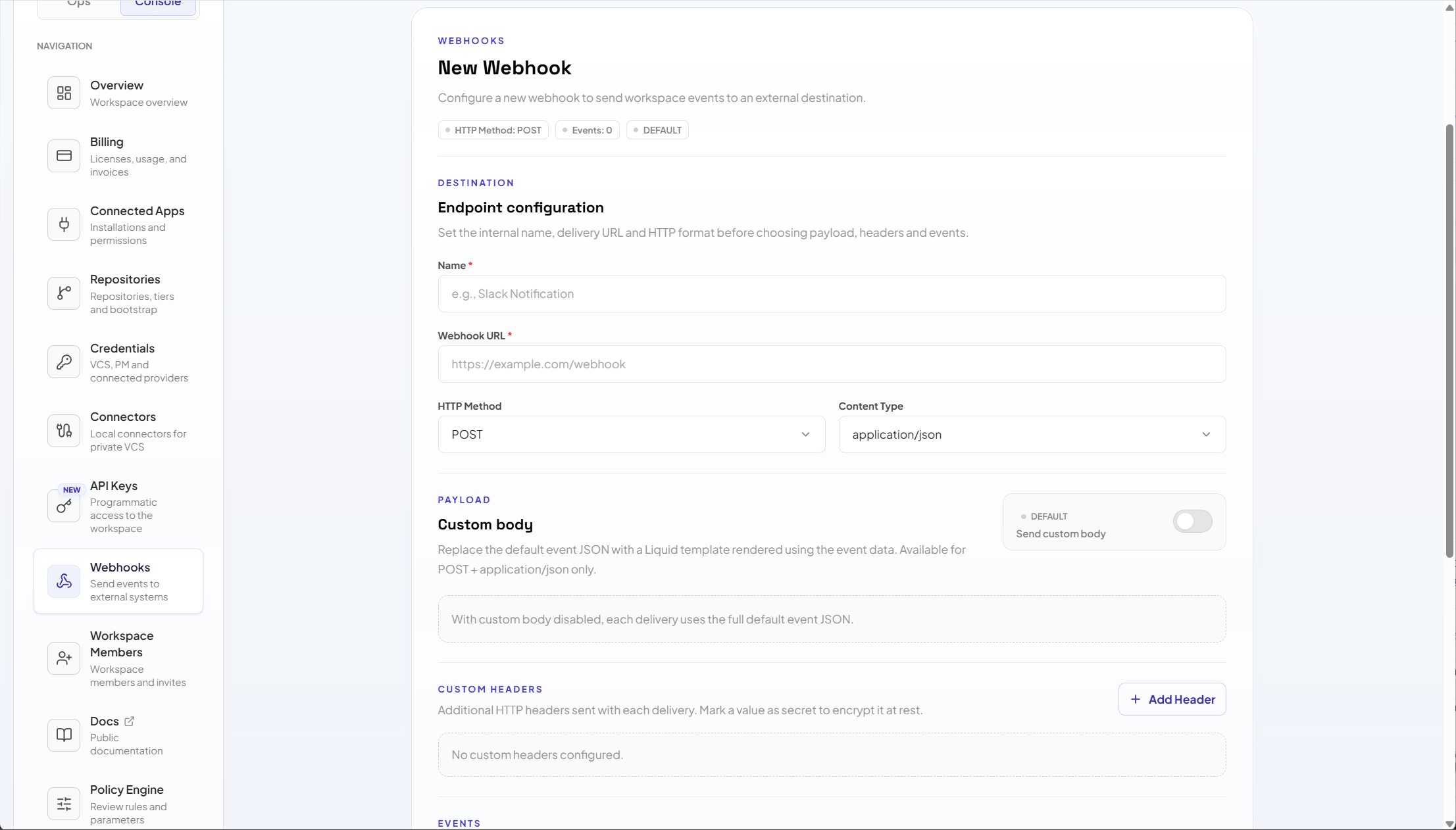 Go to `Console > Webhooks`.
Choose `New webhook`.
Fill in name, URL, method, and content type.
Choose the events that should trigger the webhook.
Add required headers and enable HMAC when the recipient can validate signatures.
Use the Test event action to send a sample delivery and preview the request before enabling in production.
Save and monitor the first deliveries.
## Headers and secrets
Use headers to send tokens, identifiers, or information required by the destination.
Best practices:
* mark any header that contains a token or secret as secret;
* do not put secrets in the webhook name;
* prefer token rotation in the destination system;
* remove headers that are not used;
* document the endpoint owner internally.
## HMAC
HMAC allows the destination system to validate that the payload came from Acrity and was not changed in transit.
Use HMAC whenever the destination supports signature verification.
When enabling:
1. Generate or enter a strong secret.
2. Configure the same secret in the destination system.
3. Test a delivery.
4. Reject payloads without a valid signature at the destination.
For a step-by-step recipe on validating the signature at the receiver, see [Webhook signatures](/en/security/webhook-signatures).
## Body template
The body template customizes the body sent. Use it when the destination expects a specific format.
Recommendations:
* start with a simple payload;
* validate with preview before saving;
* avoid including unnecessary sensitive data;
* maintain compatibility with the destination system;
* version important changes on the receiver side.
## Test delivery
Before activating a critical webhook:
* use the Test event action;
* confirm destination response status;
* check receiver system logs;
* validate HMAC signature when enabled;
* review headers and content type;
* confirm that the expected payload arrived.
## Delivery history
The webhook detail page can display delivery history.
Use this history to investigate:
* successful or failed sends;
* status returned by the destination;
* response time;
* test or delivery payload when shown by the screen;
* connection, TLS, or validation errors.
## Activate and deactivate
Deactivate a webhook when:
* the destination is under maintenance;
* the endpoint was replaced;
* secret exposure is suspected;
* the integration is generating noise;
* you need to pause deliveries temporarily.
Reactivate only after validating the destination.
## Common issues
| Symptom | What to check |
| --------------------------- | ------------------------------------------------------------------------------------------- |
| Webhook does not save | Check URL, method, content type, events, and screen validations. |
| Test returns an error | Check whether the endpoint is publicly reachable or reachable through the expected network. |
| Destination rejects payload | Check content type, template, and schema expected by the receiver. |
| Invalid signature | Check HMAC secret on both sides and whether the receiver uses the correct raw payload. |
| TLS error | Fix destination certificate. Avoid ignoring SSL in production. |
## Security
Webhooks can send operational data outside Acrity. Configure only trusted destinations and periodically review which events are active.
Details about data handling are in `Security > Data handling`.
Go to `Console > Webhooks`.
Choose `New webhook`.
Fill in name, URL, method, and content type.
Choose the events that should trigger the webhook.
Add required headers and enable HMAC when the recipient can validate signatures.
Use the Test event action to send a sample delivery and preview the request before enabling in production.
Save and monitor the first deliveries.
## Headers and secrets
Use headers to send tokens, identifiers, or information required by the destination.
Best practices:
* mark any header that contains a token or secret as secret;
* do not put secrets in the webhook name;
* prefer token rotation in the destination system;
* remove headers that are not used;
* document the endpoint owner internally.
## HMAC
HMAC allows the destination system to validate that the payload came from Acrity and was not changed in transit.
Use HMAC whenever the destination supports signature verification.
When enabling:
1. Generate or enter a strong secret.
2. Configure the same secret in the destination system.
3. Test a delivery.
4. Reject payloads without a valid signature at the destination.
For a step-by-step recipe on validating the signature at the receiver, see [Webhook signatures](/en/security/webhook-signatures).
## Body template
The body template customizes the body sent. Use it when the destination expects a specific format.
Recommendations:
* start with a simple payload;
* validate with preview before saving;
* avoid including unnecessary sensitive data;
* maintain compatibility with the destination system;
* version important changes on the receiver side.
## Test delivery
Before activating a critical webhook:
* use the Test event action;
* confirm destination response status;
* check receiver system logs;
* validate HMAC signature when enabled;
* review headers and content type;
* confirm that the expected payload arrived.
## Delivery history
The webhook detail page can display delivery history.
Use this history to investigate:
* successful or failed sends;
* status returned by the destination;
* response time;
* test or delivery payload when shown by the screen;
* connection, TLS, or validation errors.
## Activate and deactivate
Deactivate a webhook when:
* the destination is under maintenance;
* the endpoint was replaced;
* secret exposure is suspected;
* the integration is generating noise;
* you need to pause deliveries temporarily.
Reactivate only after validating the destination.
## Common issues
| Symptom | What to check |
| --------------------------- | ------------------------------------------------------------------------------------------- |
| Webhook does not save | Check URL, method, content type, events, and screen validations. |
| Test returns an error | Check whether the endpoint is publicly reachable or reachable through the expected network. |
| Destination rejects payload | Check content type, template, and schema expected by the receiver. |
| Invalid signature | Check HMAC secret on both sides and whether the receiver uses the correct raw payload. |
| TLS error | Fix destination certificate. Avoid ignoring SSL in production. |
## Security
Webhooks can send operational data outside Acrity. Configure only trusted destinations and periodically review which events are active.
Details about data handling are in `Security > Data handling`.