

Who uses the Console
Roles are fixed capability sets defined by Acrity. They are not configured per organization, so the same role grants the same access in every workspace.
The interface shows only the menus allowed for your role and the selected workspace.
Console navigation
The left navigation lists the areas you can open in the selected workspace.
Repositories, Policy Engine, Webhooks, API Keys, Audit Trail, Credentials, and Connectors require a Workspace admin. Platform admins also have access to these areas.
Adjacent destinations
Two related areas are reached from outside the left navigation:The Overview dashboard
Overview is the first screen you see for a workspace. It orients you and surfaces the next action.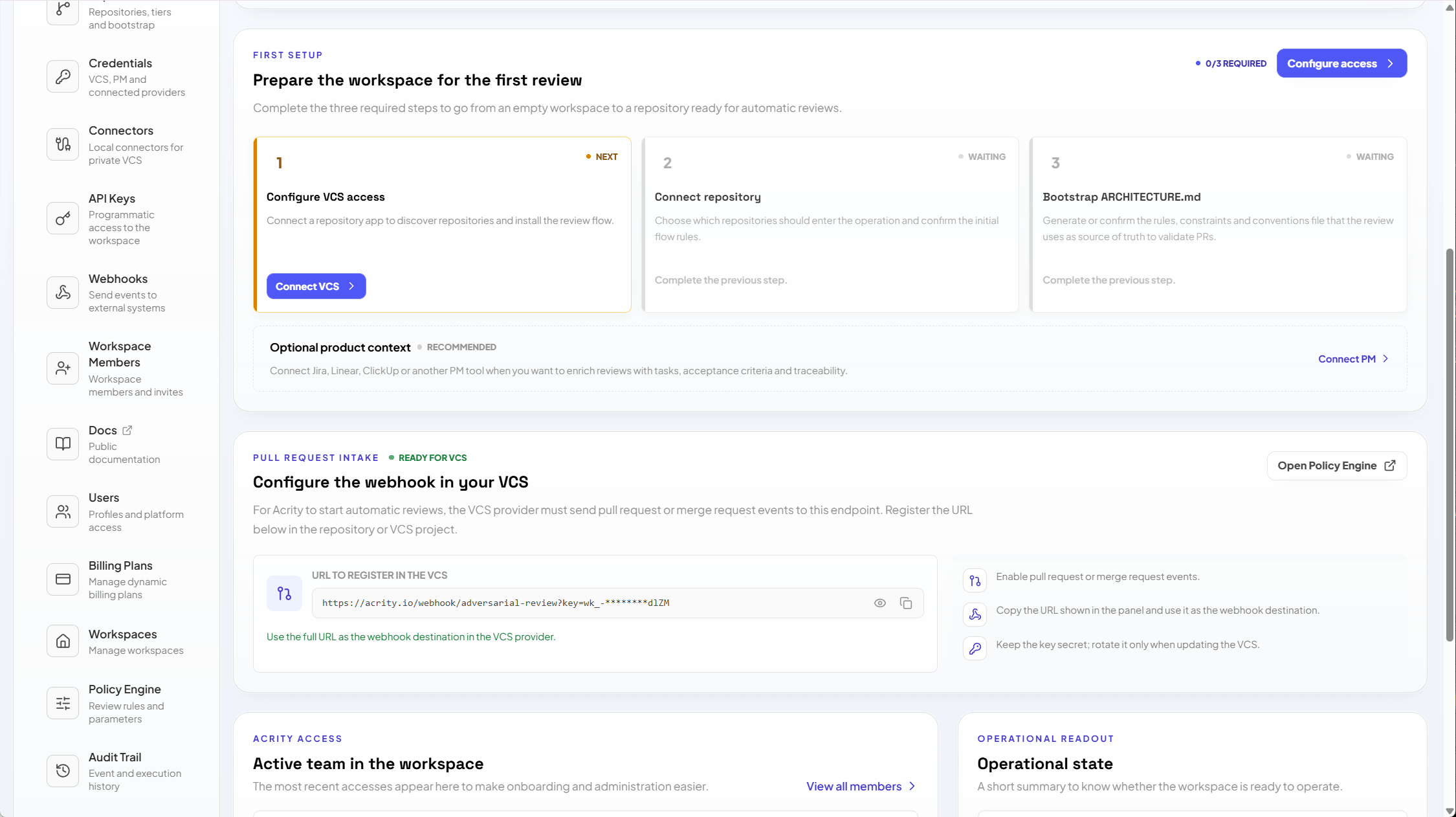
First-time setup checklist
For a new workspace, the dashboard shows a setup checklist that walks you through the minimum needed to receive reviews:1
Configure VCS access
Install a Connected App, or register a manual credential or local connector, so Acrity can reach your Git provider.
2
Connect a repository
Add at least one repository and confirm its initial review settings.
3
Bootstrap ARCHITECTURE.md
Generate the
ARCHITECTURE.md baseline for the repository so reviews have architectural context.Quick actions
Quick actions are shortcuts to the tasks you run most often, such as connecting a repository, inviting a member, opening the Policy Engine, or jumping to Billing. They target the same areas as the left navigation, so you never have to hunt for the starting point.Status tiles
Status tiles summarize the workspace at a glance and highlight anything that needs attention, including:- connected repositories and how many are ready for review;
- Connected Apps, credentials, and connectors, with any that need reauthorization or revalidation;
- recent review activity;
- billing state, including trial, wallet balance, and spend cap.
Inbound webhook and review triggers
The dashboard shows an inbound webhook card with the endpoint URL and a signing secret. This is how your Git provider tells Acrity that a pull or merge request needs a review.- When you use a Connected App, this webhook is registered for you.
- When you use a manual credential or a local connector, copy the URL and signing secret into your provider’s webhook settings.
Explore the Console
Repositories
Connect repositories and set review, branch rules, and architecture bootstrap.
Connected Apps
Install OAuth integrations and official provider apps.
Credentials
Register manual provider credentials when a Connected App is not used.
Connectors
Reach private or self-hosted VCS providers with local connectors.
Policy Engine
Configure workspace-level review policies.
Workspace Members
Invite people, change roles, and manage access.
Webhooks
Send workspace events to external systems.
API Keys
Create keys for the Acrity public API.
Billing
Manage trial, wallet, usage, invoices, and spend caps.
Audit Trail
Review technical and administrative event history.
Recommended setup flow
1
Select the workspace
Use the workspace selector. Confirm name, description, language, and allowed domains where visible.
2
Invite workspace admins
Go to
Console > Workspace Members and add the people responsible for repositories, integrations, and billing.3
Connect providers
Use
Console > Connected Apps for OAuth integrations or official apps. Use Console > Credentials when a manual credential is required.4
Connect repositories
Go to
Console > Repositories > Connect repository, choose the source, and review initial settings.5
Adjust review policies
Use
Console > Policy Engine for workspace defaults and Console > Repositories > Repository detail > Review for repository-level exceptions.6
Configure outbound integrations
Use
Console > Webhooks and Console > API Keys when external systems need to receive events or query the public API.7
Validate billing and limits
Go to
Console > Billing to check trial, wallet, spend cap, and usage history.Attention indicators
The Console highlights menus with alerts when there are pending actions, such as:- credentials that are invalid, pending, or need validation;
- repositories not yet ready for review;
- Connected Apps that require reauthorization;
- connectors that are offline or whose last revalidation failed;
- suspended billing, an ended trial, insufficient wallet, or a reached spend cap.