

Security scans section appears on the repository detail page.
Where to configure
Security scans are configured underRepositories, which requires a Workspace admin (platform admins also have access). Open the target repository and find the Security scans section.
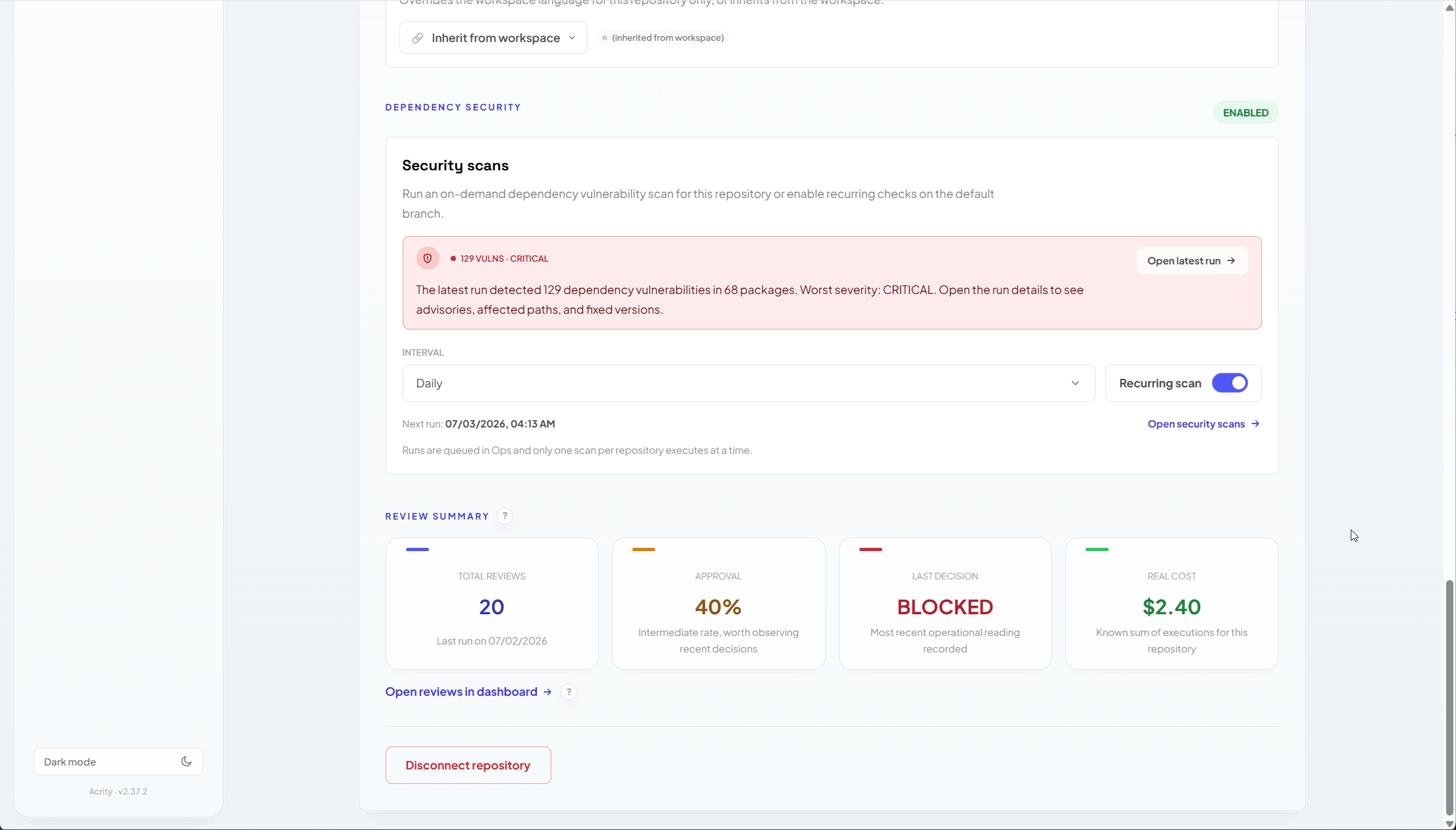
- enable or disable recurring scans;
- choose the scan interval;
- start an on-demand scan when allowed;
- open the latest result;
- track the vulnerability count, affected packages, and worst severity.
What appears in the result
A scan result can include:How to enable
1
Open the repository
Go to
Repositories and select the repository you want to scan.2
Find Security scans
Confirm the section is available for the repository’s provider.
3
Enable recurring scans
Turn on recurring scans and choose the interval for the main branch.
4
Save
Confirm the change, then track the next scan from the repository detail page.
On-demand scans
When on-demand scans are available, use one to validate a fix, review a newly connected repository, or investigate an alert. For automations, use API keys with:SecurityScans.Readto list and retrieve results;SecurityScans.Writeto start scans.
Common limitations
A scan might not run when:- the repository is not ready yet;
- the linked credential lost permission;
- the provider does not support the required action;
- the repository does not contain recognized dependency manifests;
- another scan is already running for the same repository.
Audit Trail to investigate.